GTA-2 documentation#
GTA-2 · Grounded Task Axes
This documentation covers GTA-2 installation and configuration, planning and refinement workflows, hardware setup, and controller and device interfaces.
Use the cube scene to generate, refine, and inspect a plan. No robot required.
Check ROS, camera geometry, robot state, and gripper readiness before motion.
Build a small controller, then explore robot, camera, and gripper adapters.
Save an approved plan, load a working copy, and ground it in a new scene.
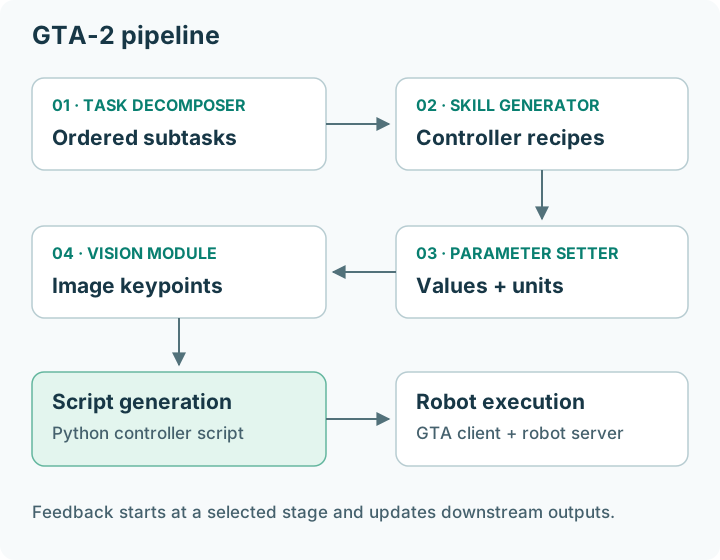
Task decomposition, controller selection, parameterization, visual grounding, script generation, and robot execution.#
Select any diagram or screenshot to open the full-size asset.
Choose your starting point#
New to GTA? Read what GTA does, complete installation, and follow the image-only tutorial.
Already running a robot? Start with the hardware checklist. The reference workcell uses ROS 2 Humble, UR5e, Robotiq, and ZED; other devices need compatible interfaces or an adapter.
Looking up a detail? Use the configuration reference, controller catalog, or glossary.
For robot operation, follow the execution guide.